
Misreading an EOB costs the average medical practice between $50,000 and $100,000 per year in missed underpayments and unworked denials. The Explanation of Benefits is the single most important document in your revenue cycle, yet most billing teams scan it for the payment amount and move on. That’s a problem, because every field on an EOB tells you something about whether you got paid correctly, and knowing how to read each one is the difference between catching a $40 underpayment and letting it slide.
This guide walks through every section of a standard EOB, explains what each field means in plain language, and shows you what to do when something doesn’t look right. Whether you’re a practice manager, a billing specialist, or a provider who wants to understand the paperwork, here’s how to read an EOB from top to bottom.
What an EOB Is (and What It Isn’t)
An EOB is a statement from an insurance company that explains how a claim was processed. It is not a bill. This is the most common point of confusion for patients and staff alike. The EOB shows what was billed, what the insurance allowed, what insurance paid, and what the patient owes. It’s a record of the payer’s decision on a specific claim.
Every payer formats their EOBs slightly differently, but the core fields are the same across all of them. Once you know how to read one, you can read any of them. The electronic version (called an ERA, or Electronic Remittance Advice, transmitted as an 835 file) contains the same data in a standardized format that your practice management system can auto-post. Learning to read the paper EOB helps you verify that the electronic posting is accurate.
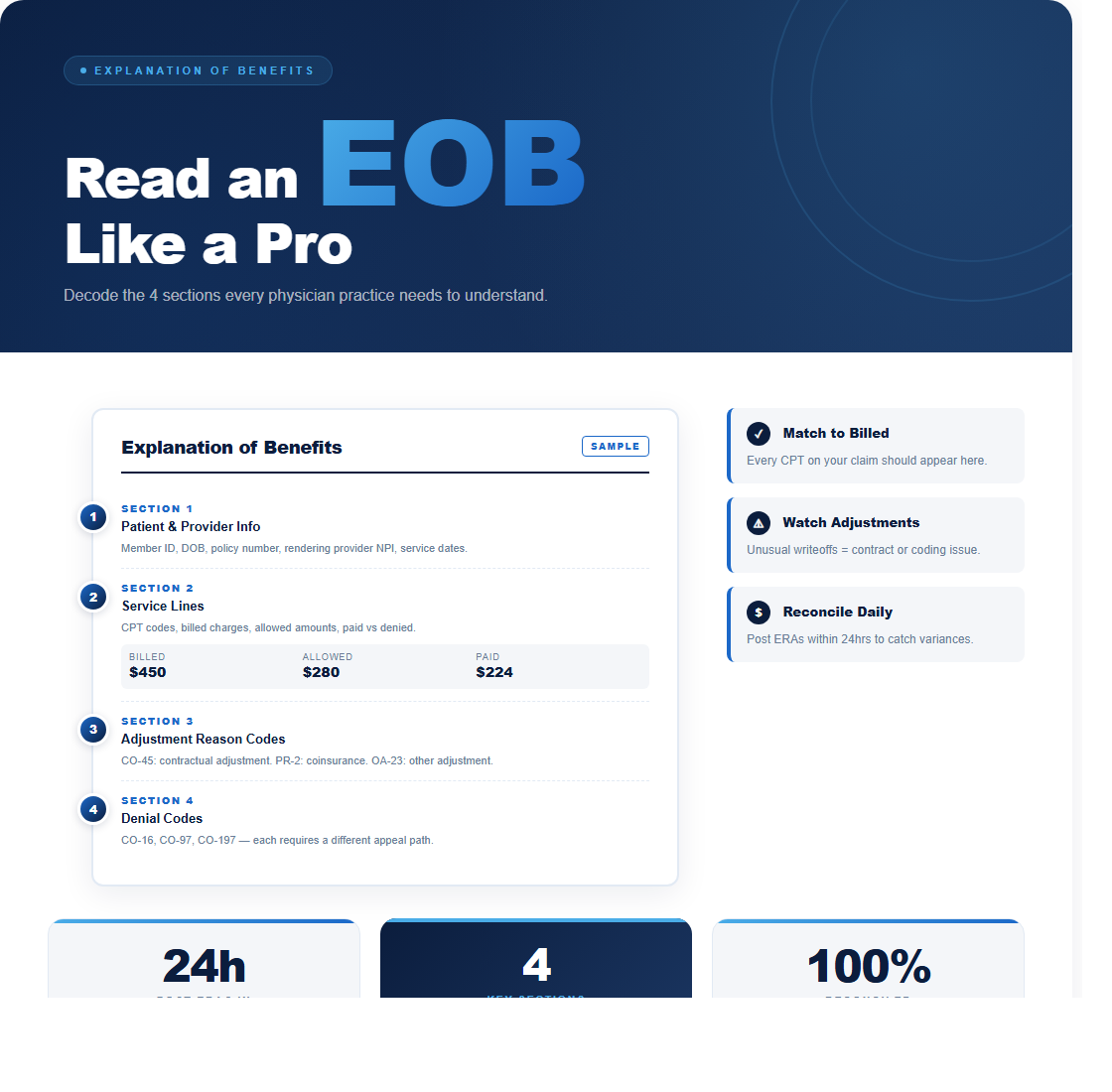
Section 1: Patient and Provider Information
The top of the EOB identifies the patient (subscriber name, member ID, group number), the rendering provider, and the claim number. Check these fields first. If the patient information is wrong, the entire EOB may apply to the wrong account in your system. If the provider NPI is wrong, the payment may be incorrect because the payer applied the wrong fee schedule or contract.
The claim number is your reference for any follow-up with the payer. Write it down (or make sure it’s captured in your billing system) before you start any appeals or inquiries. Payer phone representatives will ask for this number first. Without it, you’ll spend 15 minutes on hold while they search by date of service and member ID.
Section 2: Service Lines (the Core of the EOB)
This is where most of the critical information lives. Each service line corresponds to a CPT code you billed. The columns you’ll see are:
- Date of Service (DOS): The date the service was performed. Verify it matches your records.
- CPT/Procedure Code: The procedure code you submitted. Check for any code changes the payer made (some payers will substitute a different CPT code, which changes the reimbursement).
- Billed Amount: What your practice charged. This is your fee schedule rate for that CPT code.
- Allowed Amount: What the insurance contract says you can be paid for that service. This is the most important number on the EOB. Everything else is calculated from it.
- Contractual Adjustment: The difference between what you billed and what the payer allowed. If you billed $250 and the allowed amount is $180, the contractual adjustment is $70. You write this off.
- Insurance Paid: What the payer actually sent you. This is the allowed amount minus any patient responsibility (deductible, copay, coinsurance).
- Patient Responsibility: What the patient owes. This includes deductible (applied toward the patient’s annual deductible), copay (fixed amount per visit), and coinsurance (percentage of the allowed amount the patient pays).
Understanding Allowed Amount vs. Billed Amount
The allowed amount is determined by your contract with the payer. It’s the maximum amount the payer will reimburse for a given service. If your billed amount is higher than the allowed amount (which it should be, for every code), the difference becomes a contractual adjustment that you write off. You cannot bill the patient for this difference if you’re in-network with that payer.
Here’s a practical example. You bill CPT 99214 (established patient, moderate complexity) at $250. The payer’s allowed amount per your contract is $165. The contractual adjustment is $85. If the patient has a 20% coinsurance and has met their deductible, the payer pays $132 (80% of $165) and the patient owes $33 (20% of $165). Track these numbers over time. If the allowed amount for 99214 drops from $165 to $148 without a contract renegotiation, you’ve found an underpayment.
Section 3: Adjustment Reason Codes
When a payer doesn’t pay the full allowed amount (or denies the claim entirely), the EOB includes Claim Adjustment Reason Codes (CARCs) and Remittance Advice Remark Codes (RARCs) that explain why. These codes are standardized across all payers, and learning the most common ones saves hours of phone calls.
The codes you’ll see most often:
- CO-45: Charges exceed the fee schedule or maximum allowable. This is the standard contractual adjustment and is normal.
- CO-4: The procedure code is inconsistent with the modifier or doesn’t require a modifier. Check your modifier usage.
- PR-1: Deductible amount. The patient’s deductible hasn’t been met, so this amount is the patient’s responsibility.
- PR-2: Coinsurance amount. The patient’s share after the deductible is met.
- PR-3: Copay amount.
- CO-50: Not medically necessary. The payer determined the service wasn’t justified by the diagnosis code. This requires an appeal with clinical documentation.
- CO-27: Expenses incurred after coverage terminated. The patient’s insurance was inactive on the date of service.
- CO-97: Payment adjusted because the benefit for this service is included in the payment for another service. The payer bundled two codes together.
When you see a CO (Contractual Obligation) group code, the adjustment is the provider’s responsibility and cannot be billed to the patient. When you see a PR (Patient Responsibility) group code, that amount transfers to the patient’s balance. Knowing this distinction prevents billing compliance issues.
Section 4: Denial Codes on EOBs
A denied service line shows $0.00 in the insurance paid column along with a CARC that explains the denial reason. Not every denial is final. Soft denials (requests for additional information) can be resolved by sending the requested documentation. Hard denials (service not covered, timely filing exceeded) require a formal appeal or may not be recoverable at all.
When you see a denial, take these steps within 24 hours: (1) identify the CARC and RARC codes, (2) check whether the denial is correctable (wrong code, missing modifier, outdated eligibility) or needs a clinical appeal, (3) verify the appeal deadline for that payer (typically 60 to 180 days from the denial date), and (4) either correct and resubmit or file a formal appeal with supporting documentation. Track every denial by code and payer in a spreadsheet or your billing system’s denial management module.
Reconciling EOBs with Your Billing System
After you’ve read and understood the EOB, reconcile it with what your billing system shows. The payment posted should match the insurance paid amount on the EOB. The patient balance should match the patient responsibility amount. The contractual adjustment should match the difference between billed and allowed. If any of these numbers don’t align, you have a posting error that needs correction.
Run a weekly reconciliation report that compares ERA auto-posted amounts against the expected payment for each CPT code based on your fee schedule matrix. This catches two problems: (1) auto-posting errors where the system applied the wrong payment to the wrong service line, and (2) payer underpayments where the allowed amount is lower than your contracted rate. Practices that reconcile weekly recover an average of 3% to 5% more revenue than those that reconcile monthly or quarterly.
What to Do When Something Looks Wrong
If the allowed amount is lower than your contracted rate, that’s an underpayment. Pull your contract, document the discrepancy, and call the payer’s provider services line with the claim number and your contract terms. Most underpayments get resolved within one phone call if you have the contract language ready. If the payer disagrees, file a formal dispute referencing the specific contract clause and fee schedule.
If a service was denied for medical necessity, gather the clinical documentation that supports the service (progress notes, lab results, imaging reports) and submit a written appeal. Include the CPT code, the ICD-10 code, and a brief clinical narrative explaining why the service was necessary for this patient. Medical necessity appeals that include clinical documentation have a success rate of approximately 60% to 70%.
The bottom line: every EOB is a financial report card for that claim. Reading it carefully, checking the math, and acting on discrepancies within 48 hours is how you protect your practice’s revenue. If your team needs training on EOB interpretation or you want us to audit your payment posting accuracy, reach out for a free review. We’ll show you exactly what you’re missing.